
Making Your "Bounce Rate" More Relevant
technique · Article · lundi, 21 septembre 2015 à 09:03:31 · 4 min
I had promised myself I would devote my time to non-IT projects at least until the beginning of October, but the temptation proves too strong: the time spent on my Piwik statistics made me want to improve the way "bounces" are counted. This short article illustrates a custom solution for this blog, which can nevertheless be adapted to any site using Piwik, or even to those using Google Analytics.

The arrows represent events, on the "Visitors in Real-Time" dashboard.
In my previous post, I attempted a definition of "bounces" in the context of web analytics, but those explanations lacked precision. Theoretically, a "bounce" is a visit that generates little interest for the person behind the screen: that person lands on your site, takes a quick look at the first page and immediately disappears. Modern web analytics systems must translate this lack of interest into metrics. How do you understand that a user is not interested in a site's content? For Piwik, a "bounce" is not necessarily limited to a single page view, but to a single action. The difference is significant: for instance, a visitor who downloads a file on a page will not be counted as a bounce. Provided, of course, that your page offers something to download!
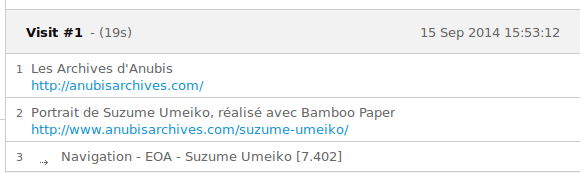
And that is what an event looks like in a visit's details.
I am currently trying to measure the interest my visitors take in the articles of this blog. The problem is that some people follow me via Twitter, Wordpress or Google+. When I publish an article, these people click the link, read the article (or not...) and leave. They are therefore counted as "bounces", without me being able to tell whether the article interested them. To overcome this limitation, I set up a custom action - an event that triggers when a visitor reaches the bottom of an article. Events are calls to Piwik - generally in the form of small bits of JavaScript - that specify that something happened. What that something is, is up to you to define. In this case, I defined:
- a category ("navigation")
- an action ("EOA" for "end of article")
- a name (the article's title)
- a value (the time elapsed between the moment the page is loaded and the moment the bottom of the article is reached)
To prevent the JavaScript code from multiplying this event, a 30-second
cooldown
has also been included: if a user zigzags between the top and the bottom of the page, they will only be counted once (or maybe twice or three times, if they keep at it for more than 30 seconds). At the code level, here is what the
snippet
present in the
footer
looks like:
var arrivalTime = new Date().getTime();
var lastEndOfArticle = 0;
$(window).scroll(function() {
cooldown = new Date().getTime();

if(
	$(window).scrollTop() + $(window).height()
	> $(document).height() - parseInt($('footer').css('height'))
	& lastEndOfArticle < (cooldown - 30000)) {

	timeSinceArrival = (cooldown - arrivalTime)/1000;
	lastEndOfArticle = cooldown;
	_paq.push([
		'trackEvent',
		'Navigation',
		'EOA' ,
		'<?php the_title(); ?>',
		timeSinceArrival
	])

}
});
These changes will shake everything up, starting with the fact that articles that are actually read will finally stand out from those that bore visitors.
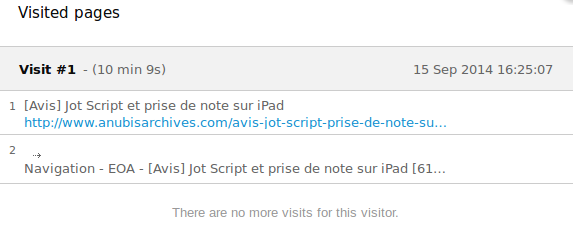
Without this system, this visit would have been counted as a bounce. Yet it turns out it lasted more than 10 minutes.
However, it will become difficult to compare the statistics of previous months with those of the months to come, since the rules have changed. On the positive side, the blog's bounce rate will drop. Unfortunately, the average time spent on the site will also plummet, since single-article visits not followed by further reading will now be counted (assuming the article is read to the end).
A number of false positives are likely to appear, since someone with little interest in an article might take the trouble to check its length (thus scrolling to the bottom of the article and triggering the EOA event), before running away. These false positives can fortunately be detected: if a person reaches the bottom of the article after 4 seconds without ever scrolling back down, one can assume they did not read it all. And frankly, I would rather have a few false positives than a horde of false negatives that cannot be spotted.
Icing on the cake, this change also solves another problem: when arriving on a site with several articles, some visitors open multiple tabs and read them one after the other. For Piwik, the time spent on article A is equivalent to [time spent on page A] = [time at which you arrive on page B] – [time at which you arrive on page A]. If a visitor opens two articles in a row in different tabs, the time spent on the first article will therefore be equivalent... to the time they take to open the second article. An erroneous result. With the event system, it will be possible to distinguish the moment the visitor opens the article from the moment they reach its footer.